What Versions Are (Read This First)
Versions represent the state of a worldbuilding element at a specific point in the story.
They are not:
backups
undo history
snapshots for rollback
Each version is tied to a book and chapter, and the manuscript editor always displays the version that is correct for the chapter you are currently writing.
Creating a New Version
Note: An initial Baseline version is automatically created when the element is first created.
This baseline appears at the book and chapter selected during creation.
Click Here to learn how to create a new worldbuilding element
Steps
1. Select the element
From the Worldbuilding Portal, click the element you want to create a new version for.
2. Open the Version Timeline
Click the button next to + Add Card.
This button will display either:
Baseline, or
Book X, Chapter Y
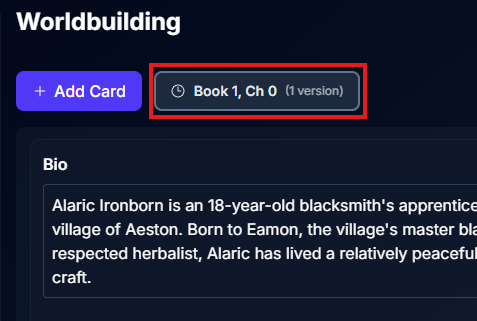
Clicking this opens the Version Timeline.
3. Create a new version
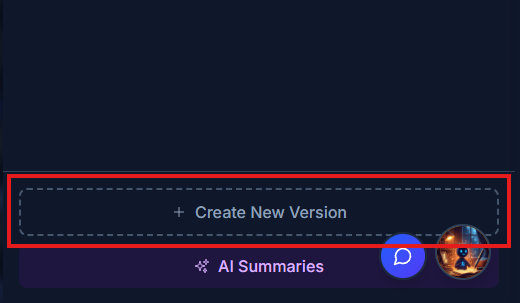
At the bottom of the Version Timeline, click:
+ Create New Version
4. Define where the version applies
In the Create Version dialog:
Book Number (required)
Chapter Number (required)
Version Name (optional)
Version Notes (optional)
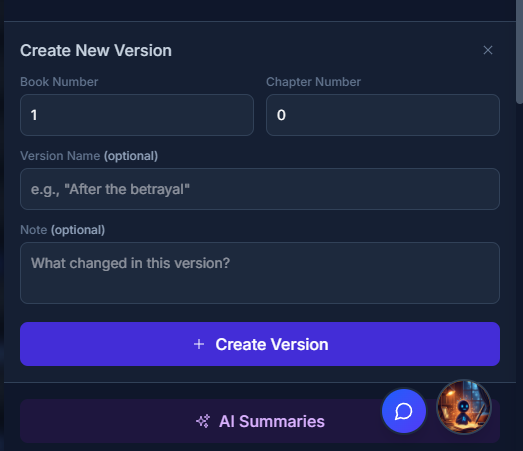
Click + Create Version.
When a new version is created, it is automatically populated with all fields from the most recent version that exists before that chapter.
This gives you a complete, accurate starting point for the story state at that moment.
Examples
If versions exist for:
Chapter 1
Chapter 3
Chapter 4
Chapter 7
Then:
Creating a version for Chapter 10 copies the version from Chapter 7
Creating a version for Chapter 2 copies the version from Chapter 1
You are never starting from a blank element unless no prior versions exist.
5. Edit only what has changed
The new version is automatically loaded into the canvas.
Add, remove, or edit only the fields that have evolved
Unchanged information does not need to be duplicated
All changes auto-save, indicated by the auto-save status in the version timeline button
6. Switch between versions
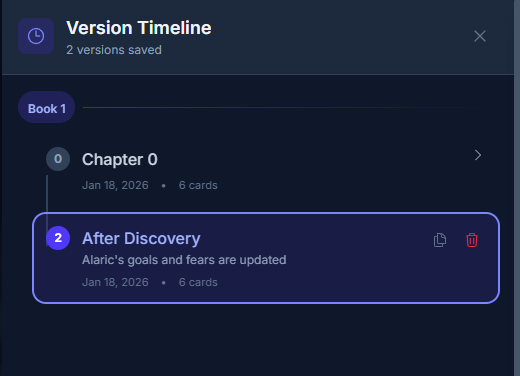
Use the Version Timeline at any time to change which version is currently loaded in the canvas for editing.
How the Manuscript Editor Uses Versions (Critical)
When writing, the manuscript editor always pulls the latest valid version up to the current chapter.
The logic works like this:
The editor checks for a version tied to the current chapter
If none exists, it uses the most recent version before that chapter
Future versions are intentionally ignored
Example
Versions exist for:
Chapter 1
Chapter 3
Chapter 4
Chapter 7
Current Chapter | Version Displayed |
|---|---|
Chapter 10 | Chapter 7 |
Chapter 6 | Chapter 4 |
Chapter 3 | Chapter 3 |
This ensures the notes panel always reflects the correct story state.
Important Notes & Best Practices
You do not need to create a version for every chapter
Create versions only when something meaningfully changesYou can keep a single version (Baseline only) for the entire story if nothing evolves
Each chapter can have only one version per element
Versions exist to maintain story continuity
Why This Matters
Versioning allows:
Characters to evolve naturally
Locations to change over time
Facts to be true when they should be and not before or after
The manuscript editor will always show the version that makes sense for the chapter you are writing, automatically.