Analytics shows how your writing is going: how much you write each day, how long your sessions last, when you write fastest, how your chapters measure up to their targets, and when you're likely to finish. It's built from your own writing in the Manuscript Editor, so there's nothing to set up.
Opening Analytics
Go to your book's home page (click Workspace Home at the top right if you're elsewhere in the project) and click the Analytics card. In a series, the card in the Series Hub is called Series Analytics.
How your writing is tracked
Words are counted as you write in the Manuscript Editor. Each change to your word count is added to today's total. Deleting words takes them off again, so a day of heavy cutting can show fewer words than you typed.
Days follow your own clock. Words count towards the date on your computer when you wrote them.
Sections that don't count aren't tracked. If a section is set not to count towards your book's words (a dedication, for example), writing in it doesn't add to your daily totals.
A writing session starts the first time your word count changes, and lasts until your last change. A pause of more than 10 minutes ends it, so your next change starts a new session. Switching to another book starts a new one too.
Daily totals include everyone writing in the book. The sessions table shows only your own sessions.
What you'll see
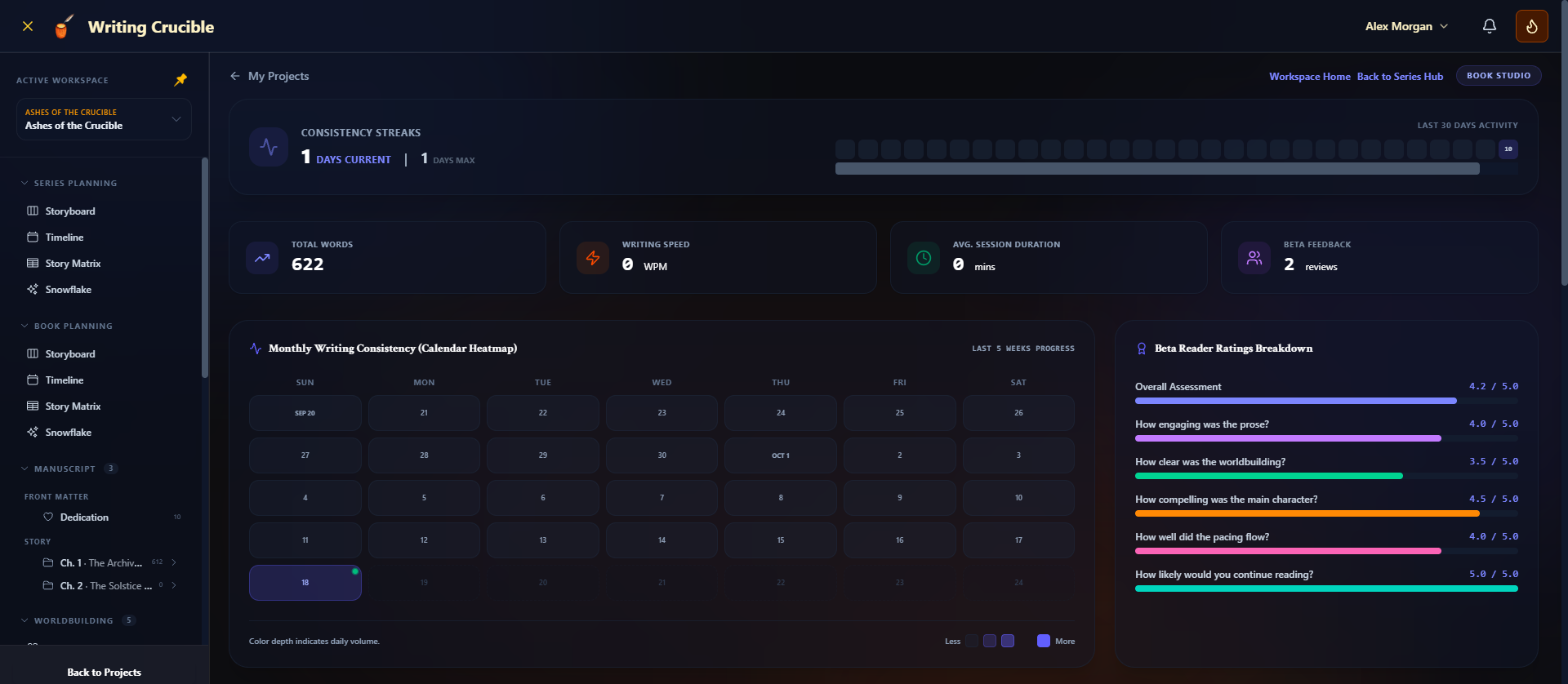
Consistency Streaks
Days Current is how many days in a row you've written, up to today (or yesterday, if you haven't written yet today). Days Max is your longest run in the last 30 days. Next to it, Last 30 Days Activity shows a square for each day; hover over one to see that day's words.
Summary cards
Total Words: your book's current word count, counting only the sections that count towards it.
Writing Speed: your average words per minute across your sessions.
Avg. Session Duration: how long a session usually lasts, in minutes. Sessions under 30 seconds are left out.
Beta Feedback: how many feedback submissions your beta readers have sent for this book.
Monthly Writing Consistency (Calendar Heatmap)
The last five weeks as a calendar. The deeper the colour, the more you wrote: the key runs from Less (nothing) through 1–99, 100–499 and 500–999 words to More (1,000 or more). Today has a small green dot. Hover over a day to see its date and word count.
Beta Reader Ratings Breakdown
Average ratings from your beta readers. Beta reader feedback is covered in its own articles.
Golden Hours and Weekly Writing Speed Distribution
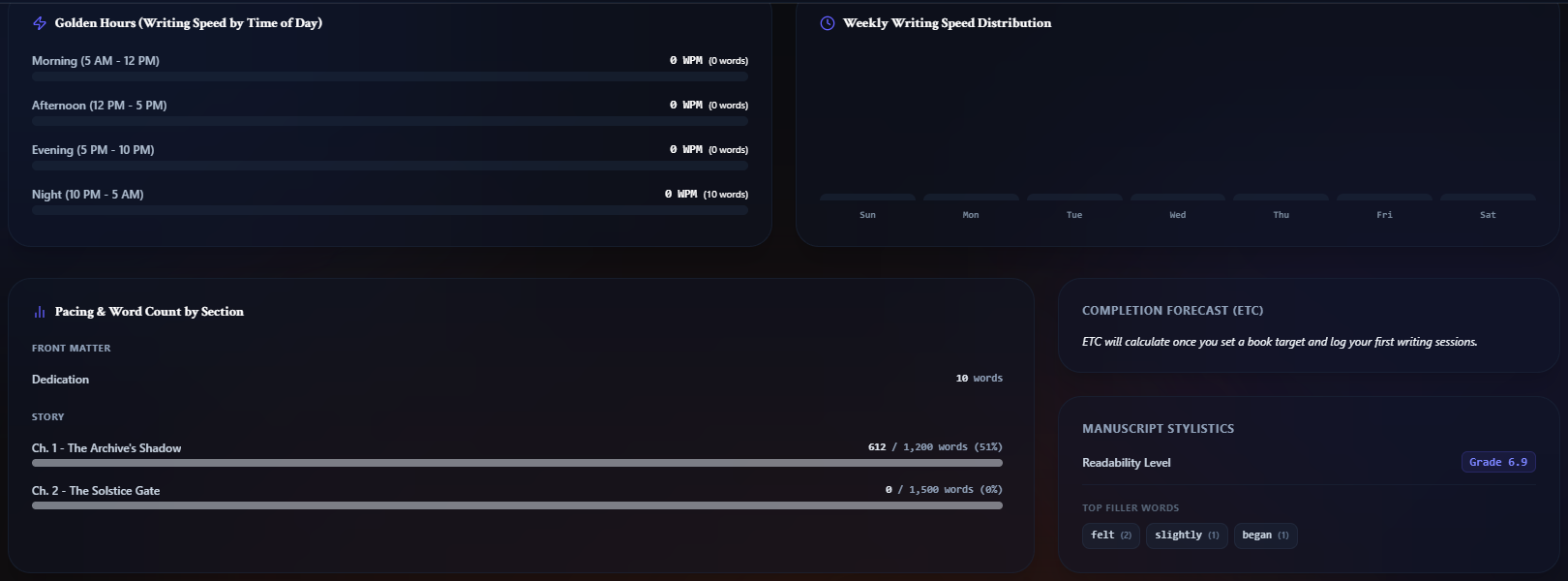
Golden Hours (Writing Speed by Time of Day) compares your speed in the Morning (5 AM - 12 PM), Afternoon (12 PM - 5 PM), Evening (5 PM - 10 PM) and Night (10 PM - 5 AM), and marks your fastest with Peak. Weekly Writing Speed Distribution does the same for each day of the week. Hover over a bar to see the words behind it. Both are based on when your sessions started.
Pacing & Word Count by Section
Each chapter's words against its target, with a percentage. If a chapter has no target, 1,500 words is used. The bar's colour shows the chapter's status: green for Complete, indigo for Draft, orange for Outlined. Front and back matter show their word count only. Set a chapter's target in the Story Planner or with the chapter goal in the Word Count Widget.
Completion Forecast (ETC)
An estimated finish date. It takes your average daily words over the last 30 days and works out how long the words left to reach your book's target will take. You need a book target for this: set it under Target Word Count in your book's Settings. The forecast shows the writing rate it's based on, such as 450 words/day. Without a target, you'll see Set a word target for this book (Book Settings) to see when you'll finish. If you have a target but haven't written in the last 30 days, it shows how many words you have left and The forecast starts once you've written in the last 30 days. When you reach your target, it shows Goal Reached!
Manuscript Stylistics
Readability Level: an approximate school grade level for your prose, from sentence length and word length. Lower grades read more easily.
Top Filler Words: the five words you use most from a list of common fillers, such as just, really, very, suddenly, seemed and felt. Hover over a word to see how many times it appears.
Recent Writing Sessions & Session-based Deltas
A table of your sessions, newest first: Started At, Duration, Words Added and Writing Velocity in words per minute. A session that hasn't finished yet shows Active / In progress. If you haven't written yet, you'll see No active sessions logged yet. Pick up your pen in the editor to start tracking!
Series Analytics
When you open Analytics from the Series Hub, the whole page is about one book: the one selected in the book switcher at the top of the sidebar. Total Words, the sessions and the Completion Forecast (ETC) are all that book's, and the forecast names the book it's for. To see the whole series' word count, use the Book Contribution to Series Word Count chart in the Series Hub, which shows each book's share of the series total.
To see a different book's analytics, select it in the book switcher.