Export your worldbuilding as a PDF to keep a copy outside Writing Crucible, print a reference sheet, or share your world bible with an editor. You can export every element at once, just the ones you've filtered to, or a single element.
Export your whole world
Open your book or series with Open Project Workspace, then click All Elements under Worldbuilding in the sidebar.
Make sure Show All is selected and the search box is empty.
Click Export in the toolbar. The PDF downloads straight to your computer.
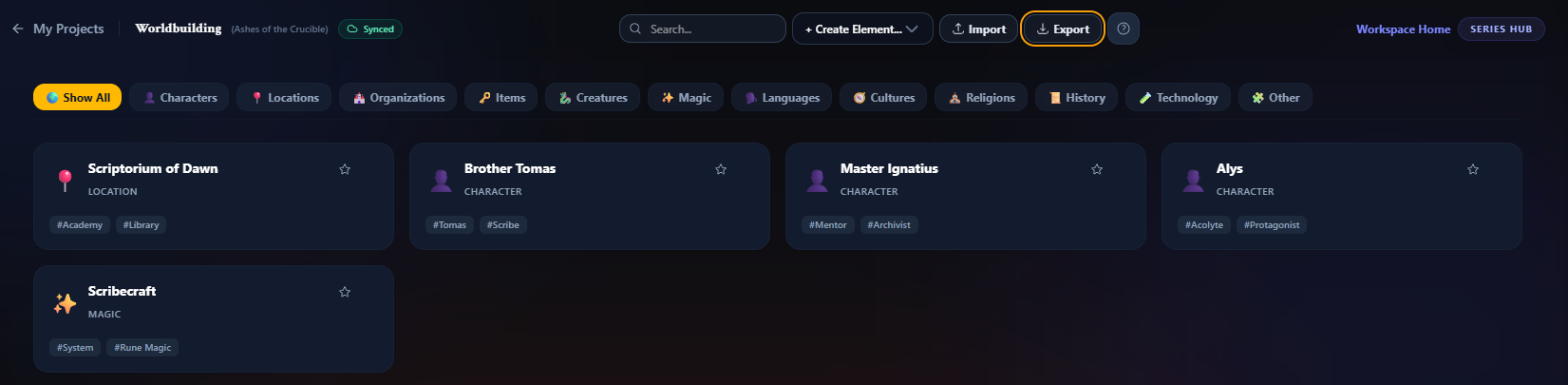
Export only some elements
The Export button exports whatever is showing. Click a type button (for example Characters) or type in the search box, then click Export. Hover over the button to check what it will include, such as Export the 3 elements shown to PDF. If nothing is showing, the button is greyed out.
Export one element
Open the element.
Click the download icon (Export this element to PDF) in the toolbar at the top of the canvas.

Any change you've just made is saved before the export starts, so the PDF includes it. If that save fails, nothing is exported and you'll see Your latest changes couldn't be saved, so nothing was exported. Try again.
The icon is there on phones and tablets too.
What's in the PDF
Each element starts on its own page with:
its name, type and tags,
its cards and fields as they were in its first version, where the element enters your story, and
Element Arc (changes over time): what changed in each later version, listed under the book and chapter where that version starts. An element with only one version shows No changes recorded yet.
To learn how versions work, see Worldbuilding Versioning.
The file is named after your book or series. A full export is called Worldbuilding Bible, a filtered one Worldbuilding Bible - Partial, and a single element is named after the element.
Good to know
Two-factor authentication: exporting takes your work out of the app, so you'll be asked to set up two-factor authentication first if you haven't already. See Setting Up Two-Factor Authentication (MFA).
Only your own elements: in a shared project, the export includes the elements you created. If none of the elements showing are yours, you'll see There are no elements of yours to export here.
Exporting your manuscript is separate. See Exporting Your Manuscript.