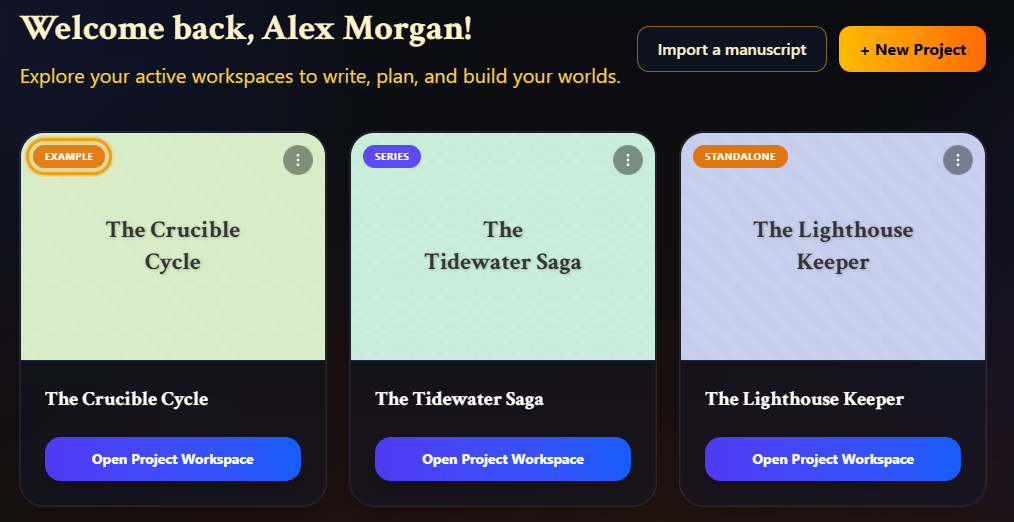
When you join as an author, your dashboard already has a project in it: The Crucible Cycle. It's a small, fully built example so you can see how every part of Writing Crucible fits together before you start on your own book. Explore it, edit it, or remove it when you're done.
What's in it
The Crucible Cycle is a fantasy series with one book, Ashes of the Crucible. On your dashboard its card is labelled Example, so you can always tell it apart from your own work.
Inside you'll find:
A manuscript with three outlined chapters: The Chamber of Fire, The Archive's Shadow and The Solstice Gate. The third is empty, ready for you to try writing.
Author notes on the chapters, which you'll see in the Notes Panel.
Story planning: timeline events and a snowflake outline.
Worldbuilding: the characters Alys and Master Ignatius, the Scriptorium of Dawn, and the magic system Scribecraft. Master Ignatius has more than one version, so you can see how an element changes as the story goes on. They're already linked to each other, so the Relationship Map shows how they connect.
Sample beta feedback, so the Beta Reader Hub has something to show.
To open it, click Open Project Workspace on its card. It opens on the Series Hub. See Your Project Workspace for a tour.
It doesn't use up your plan
Books: Ashes of the Crucible doesn't count toward your plan's book limit.
Words: the words it came with don't count toward your word limit. Anything you write in it on top of those does, just like in any other book.
Worldbuilding: its elements don't count toward the Free plan's worldbuilding limit.
Two things to know:
The example is recognised by its titles. If you rename the series or the book, it's treated as your own work and counts toward your limits.
A new book you add to the example series is your own book, so it counts toward your book limit.
Removing it
You can delete the example like any other series.
On the Author Dashboard, click the menu button (⋮) in the top-right corner of the The Crucible Cycle card and choose Delete Series.
Because the series contains a book, you're given two choices:
Delete All removes the series and Ashes of the Crucible completely.
Keep Books removes only the series, and keeps Ashes of the Crucible as a standalone book.
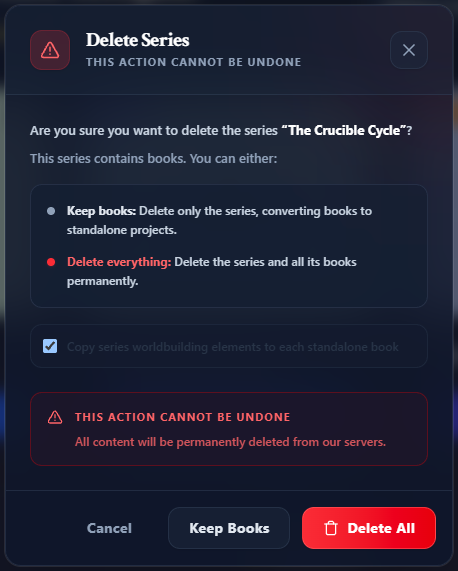
Deleting is permanent, and the example isn't added back afterwards, so only delete it once you no longer need it. See Deleting a Book or Series for exactly what each option removes.